Shopping Lists
Turn one recipe, a handful of recipes, or a whole week into a single grocery list sorted the way your shop is laid out.
You will use: CookCLI, mobile app, Cook Editor
A shopping list in Cooklang is computed, not typed. Point a tool at the recipes you plan to cook and it adds up every ingredient, merges duplicates, groups the result by store section, and drops whatever you already have. This guide uses CookCLI because it shows every step explicitly; the mobile app and Cook Editor do the same thing with a tap and read the same config files.
What you need
- CookCLI 0.35 or newer (
cook --version) - A folder of
.cookfiles. No recipes yet? Runcook seed ~/recipesto get the sample collection this guide's output comes from.
Every command below is run from inside your recipe folder:
1. Generate a list from one or more recipes
Name the recipes you plan to cook. Paths are relative to the folder you are in and the .cook extension is optional:
(You will also see Unit mismatch warnings on stderr; step 4 explains them.) Four things happened here:
- Referenced recipes were expanded. The pizza recipe calls
@./Shared/Pizza Dough{6%balls}, so the dough's flour, yeast and water are on the list even though you never named that file. Pass-i/--ignore-referencesif you only want the top-level recipes. - Duplicates were merged. Both recipes use salt. Quantities in the same unit are added together; quantities in different units are listed side by side rather than guessed at.
- Items were grouped by aisle. The headings come from
config/aisle.conf, which the sample collection ships with. Step 3 shows how to write your own. - Pantry items were left out. The pizza needs water and olive oil, but the sample
config/pantry.confsays you have both, so they are not on the list. Step 4 covers this.
Scale a recipe as you add it
Append :N to multiply a recipe. The pancakes recipe serves 2; this buys for 4:
Ingredients written with a leading = never scale, so @salt{=1%tsp} stays at one teaspoon however many portions you make. See Scaling and Servings.
Use globs for a whole folder
Leave the pattern unquoted so the shell expands it:
2. Generate a list from a meal plan
If you plan the week in a .menu file, hand that file to the same command and you get one combined list for every meal in it:
The Meal Planning guide covers writing .menu files.
3. Sort the list by store aisle
Without an aisle configuration every item lands under [other]. An aisle.conf maps ingredient names to the sections of your shop, in the order you walk through it. Create it at config/aisle.conf inside your recipe folder and CookCLI picks it up automatically:
Rules of the format:
[section]starts a section. Names are free text, so[Tesco]and[farmers market]work as well as[dairy].- One ingredient per line. Matching is case-insensitive.
a | b | cdeclares synonyms. Whatever the recipe calls it, the item files under that section and shows up asa.- Order matters. Sections and items are printed in the order written, so arrange them to match your route through the shop.
To keep the file somewhere else, point at it explicitly:
Keep a second file per shop if you split your shopping. To find out which ingredients are still uncategorised, ask the doctor:
To skip grouping entirely, use --plain:
4. Leave out what you already have
A config/pantry.conf file lists what is in your kitchen. When it exists, the shopping list subtracts those items automatically, which is why the first list in this guide has no water and no olive oil: the sample pantry has both. Compare with the pantry switched off, which adds them back:
Quantities are subtracted when the units match: a recipe needing 250 g of flour against 1 kg in the pantry drops off the list. When units differ (ml in the recipe, l in the pantry) CookCLI prints a warning and keeps the item, so write pantry quantities in the units your recipes use.
Use --pantry <file> to name a pantry file outside config/. The Pantry Management guide covers the format, expiry dates and the cook pantry commands.
5. Add things no recipe calls for
Bin bags and paper towels can ride along on the same trip. Each --extra is a Cooklang ingredient without the @:
Extras are merged like any other ingredient: they land in their aisle, add to an existing entry with the same name, and are subtracted from by the pantry.
6. Take the list with you
Print or share it. Choose a format and write it to a file. Markdown pastes cleanly into a note or a message; JSON feeds a script:
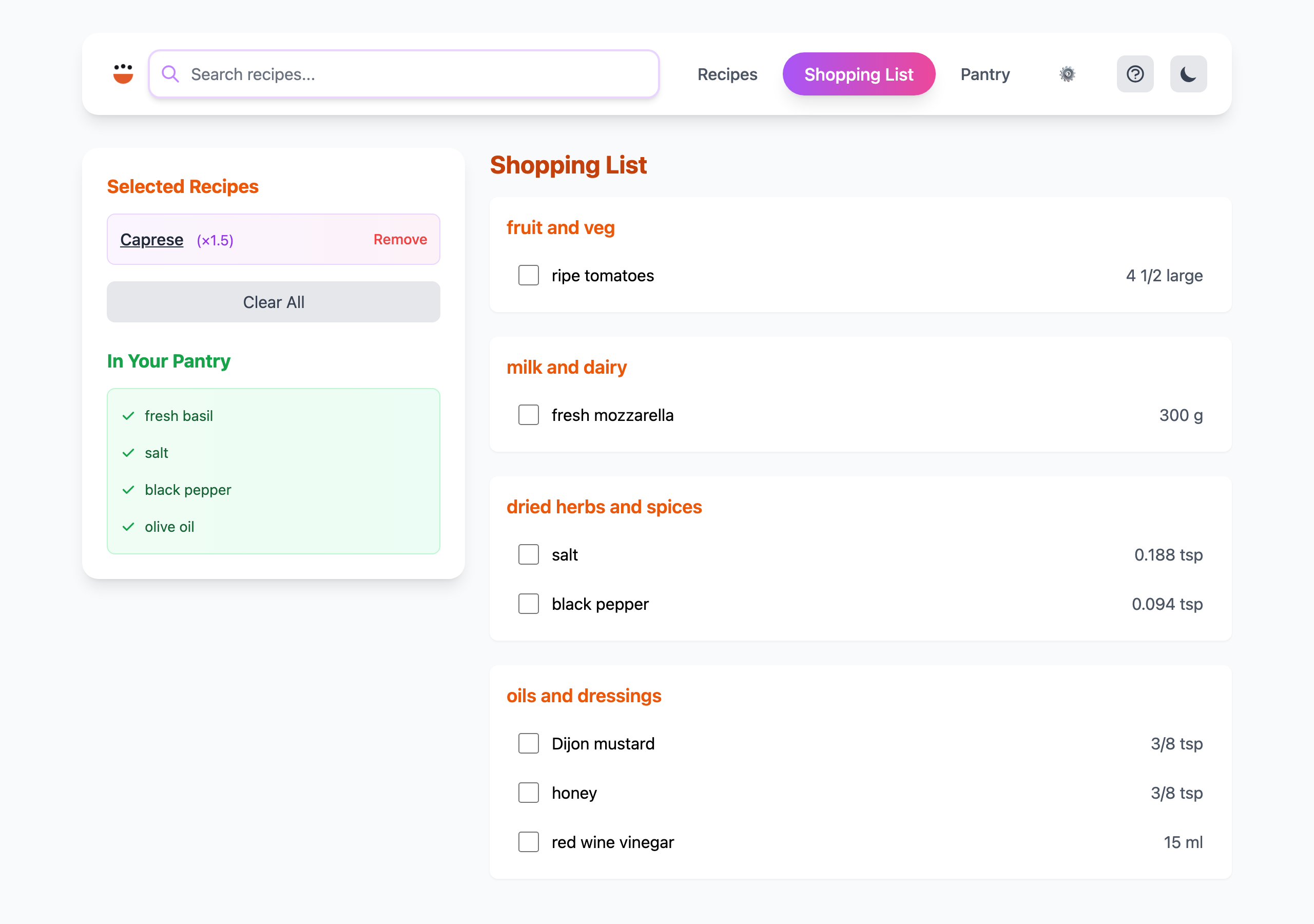
Use the phone app. The Cook app reads the same aisle.conf from your synced folder and builds an interactive list with checkboxes. Add recipes to the list from each recipe's page.
Use the browser. cook server gives every device on your network a shopping list page with checkboxes, backed by a .shopping-list file in your recipe folder (see Shopping list format). The Raspberry Pi guide sets this up permanently.
Troubleshooting
| Symptom | Fix |
|---|---|
Everything is under [other] | No config/aisle.conf was found. Create one, or pass -a. Run cook doctor aisle to see what is unmapped. |
| An ingredient appears twice with slightly different names | Add the variants as synonyms on one line in aisle.conf (onion | onions), and consider renaming in the recipes. |
Two amounts for the same item, e.g. 1 tbsp, 24.6 g | Recipes used different units. Either standardise the recipes or accept both and buy the larger. |
| Pantry item still on the list, plus a "Unit mismatch" warning | The pantry quantity uses a different unit than the recipe. Change the pantry entry to the recipe's unit. |
| A referenced recipe's ingredients are missing | Check the path in @./Folder/Name{} matches the file relative to the recipe folder root. cook doctor validate reports broken references. |
Failed to find recipe | Include the sub-folder: "Breakfast/Easy Pancakes", not "Easy Pancakes". |
See also
- Meal Planning: plan the week, then shop for it in one command
- Pantry Management: keep
pantry.confcurrent so lists stay short cook shopping-listreference: every flag- Reports: shopping lists with product links and prices via templates