Meal Planning
Write the week as a .menu file that references your recipes, then get one shopping list for all of it.
You will use: any text editor, CookCLI, Cook Editor, cook server
A meal plan in Cooklang is a .menu file: a plain-text file that names the recipes you intend to cook, grouped by day. Because it is just another Cooklang file, every tool that understands recipes understands plans too. The payoff is one command that turns the whole week into a shopping list, with the pantry subtracted and everything scaled to the number of people you are feeding.
What you need
- A handful of
.cookrecipes in a folder.cook seed ~/recipesgives you the sample collection this guide uses. - Any text editor. CookCLI to generate the list, or the Cook Editor if you prefer a visual week view.
1. Write the plan
Create a file called Weekly Plan.menu in your recipe folder. Where you keep plans is up to you; a Plans/ sub-folder keeps them out of the recipe listing.
Reading it line by line:
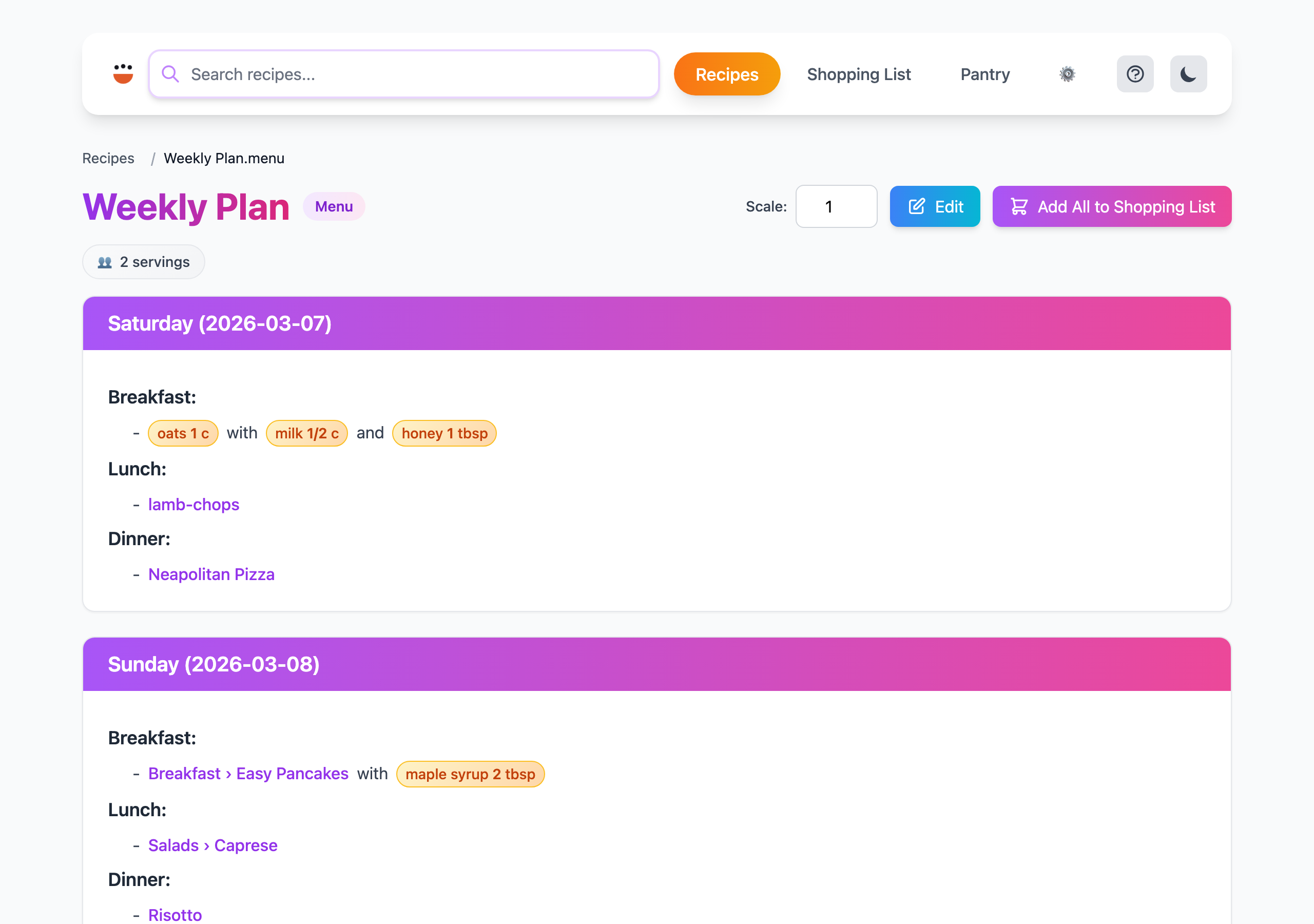
servings: 2in the front matter says how many people the plan feeds. Referenced recipes are scaled to match (see below).==Saturday (2026-03-07)==is a section, one per day. The date in parentheses is optional but worth adding: apps that recognise it can jump straight to today's meals. Any section name works, so==Day 1==or==Batch prep==are fine too.@./lamb-chops{}is a recipe reference. The path is relative to the recipe folder root, without the.cookextension, and can go into sub-folders:@./Breakfast/Easy Pancakes{}.@oats{1%cup}is an ordinary ingredient. Use these for things that do not need a recipe. They land on the shopping list like any other ingredient.\at the end of a line joins it to the next one, so "Breakfast:" and its bullet points render as one block instead of separate steps.-- save leftover lambis a comment. It is for you and is ignored by the tools.
Scaling referenced recipes
The braces after a recipe reference decide how much of it to make:
| You write | Meaning |
|---|---|
@./Risotto{} | The recipe as written |
@./Risotto{2} | Two times the recipe |
@./Risotto{6%servings} | Enough for six people, using the recipe's servings metadata to work out the factor |
@./Slow-cooker beef stew{1/2} | Half a batch, useful when one cook covers several meals |
The Conventions page has the full rules.
2. Check the plan
Render it the same way you would a recipe. The ingredient table lists every referenced recipe and loose ingredient with its scaled amount, which is a quick way to spot a typo in a path:
A reference that does not resolve shows up as a warning. cook doctor validate checks every reference in the folder at once.
3. Shop for the whole week in one command
Everything the Shopping Lists guide describes applies: ingredients are merged across days, grouped by the aisles in config/aisle.conf, and reduced by what config/pantry.conf says you already have. Scale the entire plan for guests with the usual suffix:
4. Cook from the plan
In the browser. cook server renders .menu files as a day-by-day page with links to each recipe and an "Add all to shopping list" button. The Raspberry Pi guide runs this permanently for the whole household.
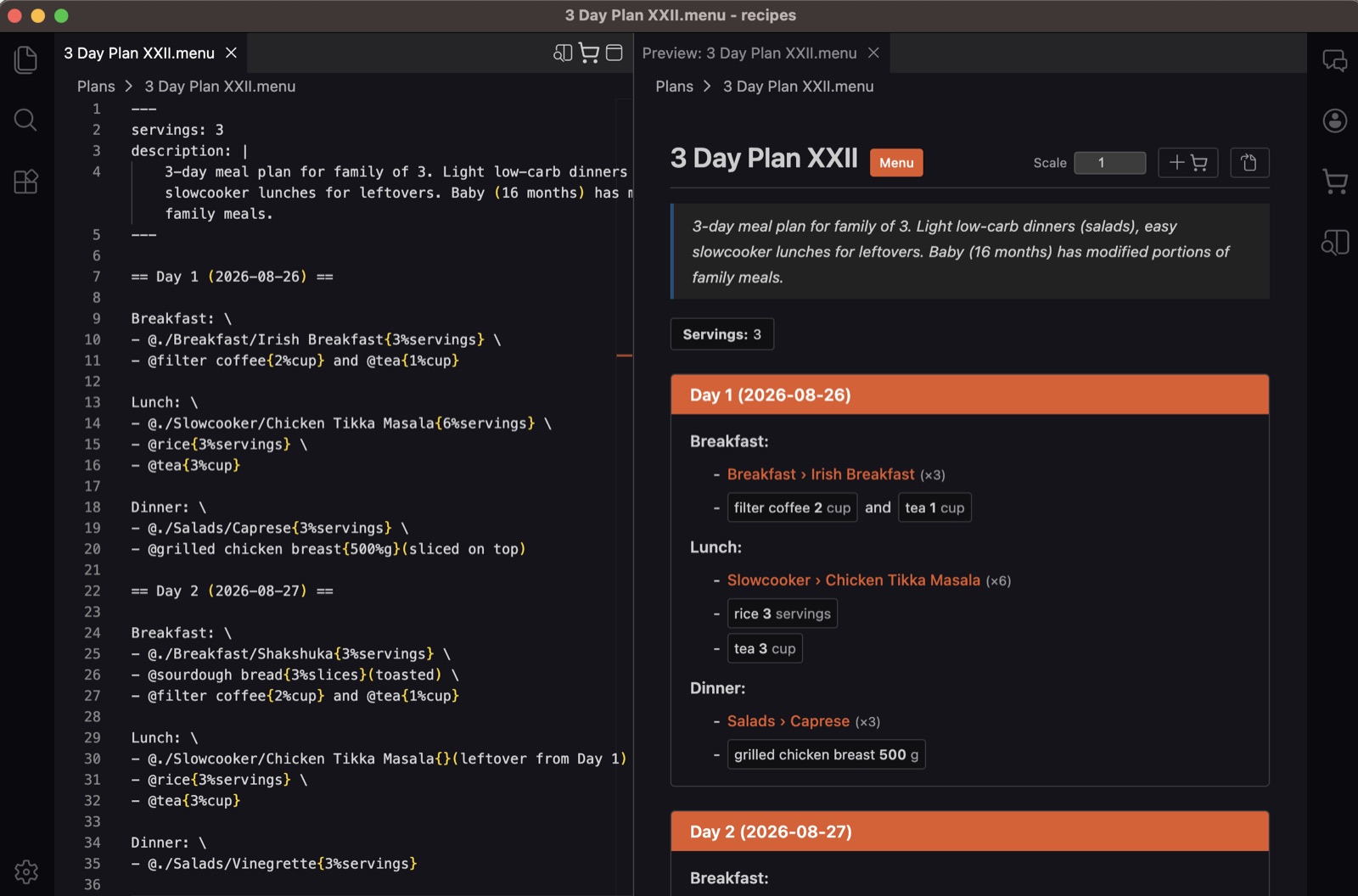
In the Cook Editor. The desktop editor shows the .menu source and a live preview side by side, with links into each recipe and the combined shopping list one click away. With CookBot it can also draft a plan from your collection for you to approve and edit.
On paper. cook recipe "Weekly Plan.menu" -f markdown gives you something printable.
Tips from a real plan
The plan below is a lightly edited three-day plan from the author's own collection. A few habits make plans like this cheaper and quicker:
- Repeat a breakfast. The burrito appears twice; prep the filling once.
- Halve a big batch.
{1/2}of the stew per lunch means one cook covers two days and the shopping list buys for exactly that. - Give snacks and batch cooking their own sections. They are not tied to a day but still need to be bought for.
- Keep old plans. A folder of past
.menufiles is a menu of menus; copy one and tweak it rather than starting from blank.
Troubleshooting
| Symptom | Fix |
|---|---|
| A recipe shows up as an ingredient, not expanded | The reference must start with @./ and match the file path from the recipe folder root, without .cook. |
| Day headings render as steps | Sections need = on both sides of the name (==Monday==). |
| Meal lines render as separate steps | Add \ at the end of every line except the last one in the block. |
| Amounts look doubled or halved | Check the number in braces: a bare number multiplies the recipe as written, N%servings scales to N people using the recipe's own servings. |
See also
- Shopping Lists: what happens to the plan at the shop
- Pantry Management: keep the list short
- Menu files in the conventions: the format in detail
- Cook Editor: the visual week view